本文由 简悦 SimpRead 转码, 原文地址 forum.obsidian.md
Originally posted on my blog here 334. Check it out for all the links out (this is my first post, so I am limited to 5 links)
最初发表在我的博客上 这里 334 .检查所有链接(这是我的第一篇文章,所以我仅限于 5 个链接)
Goals 目标
I wanted to repeatably transform markdown into a stylish, custom pdf. I use markdown to take all of my note in thanks to my undying love for Obsidian.
我想重复地将 markdown 转换为时尚的自定义 pdf。我用markdown来记下我所有的笔记,感谢我对黑曜石的不朽热爱。
For my upcoming OSCP exam retake specifically, I wanted to be able to quickly and fluidly get my notes out of Obsidian and into a professional looking report that I could be proud of turning in.
特别是对于我即将到来的 OSCP 考试重考,我希望能够快速流畅地将我的笔记从黑曜石中取出,变成一份看起来很专业的报告,我可以为上交而感到自豪。
My definition of done was this:
我对完成的定义是这样的:
- Markdown input produced PDF output
降价输入生成 PDF 输出 - I could control enough of the style to make it my own
我可以控制足够的风格来使其成为我自己的风格- Code blocks should have syntax highlighting
代码块应具有语法突出显示 - I could use colors and assets from my ever unfinished portfolio site 158
我可以使用我从未完成的作品集网站的颜色和资产 158 - Nice to have: Style is controlled within the markdown to affect the output PDF to make it easier to create a template
很高兴拥有:样式在降价中控制以影响输出 PDF,从而更轻松地创建模板
- Code blocks should have syntax highlighting
- I can reuse the style easily in other reports
我可以轻松地在其他报告中重用该样式 - The process should be easily script-able
该过程应该易于编写脚本
Tools 工具
- pandoc 潘多克
- panrun 潘润
- Eisvogel LaTeX template 363
艾斯福格尔LaTeX模板363 - Gimp to make the background images for the title page and subsequent pages
GIMP 为标题页和后续页面制作背景图像
Style 风格
I am by no means a designer, but I like to believe I am building a few brand assets with my portfolio site 158. The colors on the site are inspired heavily from the starship prompt, especially the magenta, which I modified ever so slightly and use everywhere, and the fonts I stumbled upon in fontjoy.
我绝不是设计师,但我相信我正在用我的作品集网站 158 建立一些品牌资产。网站上的颜色很大程度上受到星际飞船提示的启发,尤其是洋红色,我稍微修改了一下,到处都使用,以及我在 fontjoy 中偶然发现的字体。
I really like the techie look of the Overpass Mono headers, so I’d love to use those in my reports.
我真的很喜欢立交桥单声道标题的技术外观,所以我很想在我的报告中使用这些标题。
My intention was to create a template that I intend to use more than once, and I wanted the reports that utilize the template to be aesthetic.
我的目的是创建一个我打算多次使用的模板,并且我希望使用该模板的报表具有美感。
With that and the fact that with the Eisvogel LaTex Template allows you to set variables for page background and title page background, I went about creating those backgrounds in Gimp, which are the backgrounds on the pages in the linked document, and linked in the following section as titlepage-background: "TitlePageBackground.png" and page-background: "PageBackground.png".
有了这个,以及Eisvogel LaTex模板允许您为页面背景和标题页背景设置变量的事实,我开始在Gimp中创建这些背景,它们是链接文档中页面上的背景,并在下一节中链接为 titlepage-background: "TitlePageBackground.png" 和 page-background: "PageBackground.png" 。
Using Panrun and The Eisvogel Template
使用Panrun和Eisvogel模板
Panrun is a tool that allows you to set arguments for pandoc in the yaml frontmatter of the markdown document, so you don’t have to remember all of the arguments you must pass. My front matter ended up looking like this:
Panrun 是一个工具,允许您在 markdown 文档的 yaml 前言中为 pandoc 设置参数,因此您不必记住必须传递的所有参数。我的前言最终看起来像这样:
---
note_type: reference
writing_type: draft
title: Academy.htb
author: 5hade
titlepage: true
titlepage-rule-color: "ff0d8a"
titlepage-background: "TitlePageBackground.png"
titlepage-text-color: "eaecef"
page-background: "PageBackground.png"
colorlinks: "ff0d8a"
toc: true
toc-own-page: true
mainfont: DejaVuSerif
sansfont: Overpass Mono
linkcolor: magenta
urlcolor: magenta
listings-no-page-break: true
code-block-font-size: \scriptsize
output:
  pdf:
    pdf-engine: xelatex
    output: academy-htb.pdf
    from: markdown
    template: eisvogel
    listings: true
---
The top two yaml items are not for panrun, but are front matter I utilize in my Obsidian vault. The ones in the output block are used by pandoc, and all of the rest are used directly by the Eisvogel Template to style and format the PDF output.
前两个 yaml 物品不是用于 panrun,而是我在黑曜石金库中使用的前品。 output 块中的那些由 pandoc 使用,其余的都由 Eisvogel 模板直接用于设置 PDF 输出的样式和格式。
Reusing The Template 重用模板
Now that I’ve done this once, I can create a template to use when I want to output another report. I use the templater 92 and my template looks like this:
现在我已经完成了一次,我可以创建一个模板,以便在我想输出另一个报表时使用。我使用模板程序 92,我的模板如下所示:
---
note_type: <% tp.system.suggester(["thought", "media", "transient", "plan", "meeting", "presentation", "reference", "draft"], ["thought", "media", "transient", "plan", "meeting", "presentation", "reference", "draft"]) %>
writing_type: draft
title: <% tp.file.cursor(1) %>
author: <% tp.file.cursor(2) %>
titlepage: true
titlepage-rule-color: "ff0d8a"
titlepage-background: "<% tp.user.home_dir() %>/Pictures/pandoc/TitlePageBackground.png"
titlepage-text-color: "eaecef"
page-background: "<% tp.user.home_dir() %>/Pictures/pandoc/PageBackground.png"
colorlinks: "ff0d8a"
toc: true
toc-own-page: true
mainfont: DejaVuSerif
sansfont: Overpass Mono
linkcolor: magenta
urlcolor: magenta
listings-no-page-break: true
code-block-font-size: \scriptsize
output:
  pdf:
    pdf-engine: xelatex
    output: <%tp.file.title%>.pdf
    from: markdown
    template: eisvogel
    listings: true
---
Results! 结果!
Here are the results of making this document, as well as the write up for a retired HackTheBox machine I used to test the system out.
以下是制作本文档的结果,以及我用来测试系统的退役 HackTheBox 机器的文章。
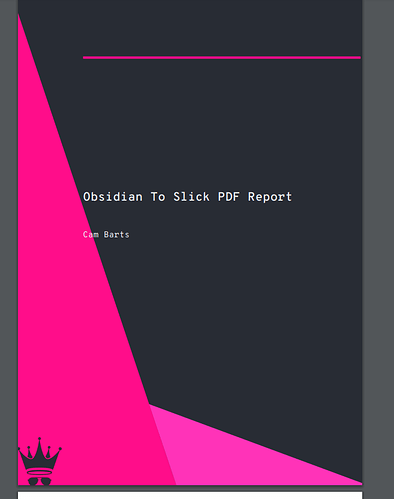
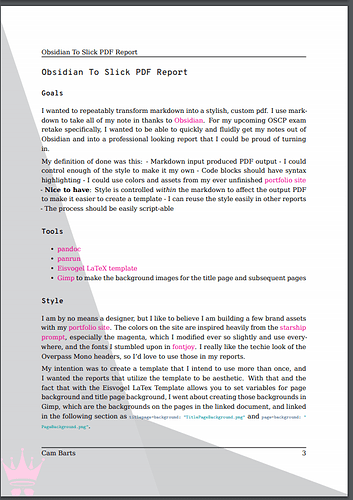

Impressive! Impressive 令人 印象 深刻!令人 印象 深刻


Now this is of real value! Thank you so much for sharing!
现在这具有真正的价值!非常感谢您的分享!
(Finally someone who uses YAML to set Pandoc and LaTeX parameters in the right way!)
(终于有人使用 YAML 以正确的方式设置 Pandoc 和 LaTeX 参数了!

Great stuff! 好东西!
What did you use to actually export the md note to Latex etc?
你用什么来实际将md笔记导出到Latex等?
Oh I don’t actually export the doc to latex ever. The latex template is something I found on github and provides options that I found were super useful. For me, with all the yaml in place, all I actually have to do is panrun <filename>.md, which will run pandoc with the options set in the yaml headers. In the template they are set as:
哦,我实际上从来没有将文档导出到乳胶。乳胶模板是我在 github 上找到的,它提供了我发现非常有用的选项。对我来说,在所有 yaml 就绪的情况下,我实际上要做的就是 panrun <filename>.md ,它将使用 yaml 标头中设置的选项运行 pandoc。在模板中,它们设置为:
pdf:
    pdf-engine: xelatex
    output: <%tp.file.title%>.pdf
    from: markdown
    template: eisvogel
    listings: true
which runs the same as pandoc --pdf-engine xelatex -o <filename>.md -f markdown --template eisvogel --listings where eisvogel is the template from github downloaded to my ~/.pandoc/templates directory
它与 pandoc --pdf-engine xelatex -o <filename>.md -f markdown --template eisvogel --listings 运行相同,其中Eisvogel是从GitHub下载到我的~/.pandoc / templates目录的模板

Do you have any ideas for alternatives to panrun?
你对泛润的替代品有什么想法吗?
- Seems fiddly to have to install ruby just for this
似乎必须为此安装红宝石很麻烦 - I’ve installed it and it still seems like it isn’t running properly
我已经安装了它,但似乎仍然无法正常运行
I don’t see any alternatives in my package manager at all. Looking at the source code (panrun/panrun at master · mb21/panrun · GitHub 27) its only 185 lines of ruby, and could probably be easily ported into python or whatever makes sense for your use case.
我在我的包管理器中根本没有看到任何替代方案。查看源代码( panrun/panrun at master · mb21/panrun ·GitHub 27 )它只有185行红宝石,可能可以很容易地移植到python或任何对你的用例有意义的东西中。
I thought exactly the same and I’m going to try and create a parallel in python
我的想法完全一样,我将尝试在python中创建一个并行
If you succeed, please do post the code here in this thread if you’re OK with that!
如果您成功了,如果您同意,请在此线程中发布代码!
Plan would be to put something up on github. May take a little while, but will post back here once I have it.
计划是在github上放一些东西。可能需要一点时间,但一旦我有了它就会发回这里。

FYI: I think you can even simplify it a bit, since Pandoc by now possesses an option for reading metadata from a yaml file 59 with --defaults=FILE. So basically, you do not need panrun.
仅供参考:我认为您甚至可以简化它,因为 Pandoc 现在拥有使用 --defaults=FILE 从 yaml 文件 59 读取元数据的选项。所以基本上,你不需要panrun。
Nice workflow, nonetheless 尽管如此,工作流程还是不错的
Oh! That’s neat, I hadn’t seen that. With that, wouldn’t you lose the ability to use the substitutions that come with Templater?
哦!这很整洁,我没见过。有了这个,你不会失去使用模板器附带的替换的能力吗?
The way I read the section in the docs, it looks like this looks for a standalone yaml file instead of being able to read the yaml in the markdown frontmatter. Perhaps my understanding of that is incorrect.
我阅读文档中该部分的方式,看起来这看起来像是寻找一个独立的 yaml 文件,而不是能够读取降价前言中的 yaml。也许我对此的理解是不正确的。
I think panrun serves the purpose of being able to change things on a per document basis, like if you wanted to change the filename or if you have different title pages for different reports for example.
我认为 panrun 的目的是能够在每个文档的基础上更改内容,例如,如果您想更改文件名,或者如果您为不同的报告有不同的标题页。
I’d love to contribute if you’re looking for one as well! Nothing against ruby, but I prefer all my tools pythonic!
如果您也在寻找一个,我很乐意做出贡献!不反对红宝石,但我更喜欢我所有的工具python!
I think you are right. From what I can tell, there is an ongoing discussion among the pandoc devs whether to include all information into one file 48.
我认为你是对的。据我所知,pandoc 开发人员之间正在进行讨论是否将所有信息包含在一个文件 48 中。

Hello I saw your message so I created a python script based on panrun
您好,我看到了您的消息,所以我创建了一个基于 panrun 的 python 脚本


[GitHub - mjcc30/panrun: Script that looks at the YAML metadata in a markdown… 89
GitHub - mjcc30/panrun:在降价中查看 YAML 元数据的脚本…89](https://github.com/mjcc30/panrun)
Script that looks at the YAML metadata in a markdown file and runs pandoc for you. - GitHub - mjcc30/panrun: Script that looks at the YAML metadata in a markdown file and runs pandoc for you.
在降价文件中查看 YAML 元数据并为您运行 pandoc 的脚本。- GitHub - mjcc30/panrun:在降价文件中查看 YAML 元数据并为您运行 pandoc 的脚本。
I’m new with python so you can make it better
我是python的新手,所以你可以让它变得更好

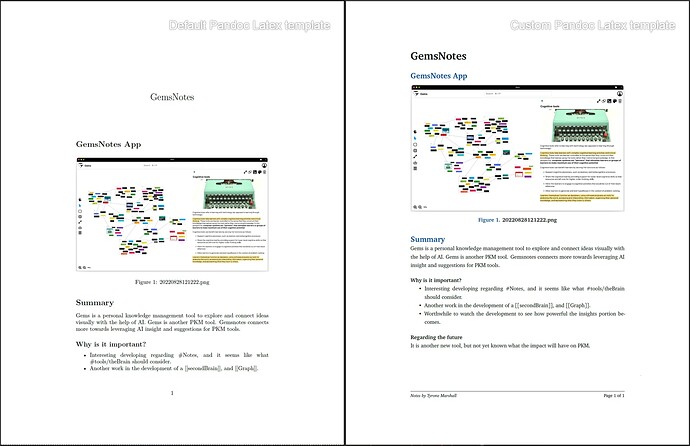
After a lot of work, I have been able to work through the Pandoc template formatting to make improvements based on prior work with LaTex templates in CLS.
经过大量工作,我已经能够完成 Pandoc 模板格式设置,以根据先前在 CLS 中使用 LaTex 模板的工作进行改进。
I find the default Pandoc template to require documentation to make it into something that others can readily and easily modify as it functions from LaTex packages and then the definition of elements to move it towards something typically found in proper typeset documents.
我发现默认的 Pandoc 模板需要文档将其制作成其他人可以轻松修改的东西,因为它可以从 LaTex 包运行,然后定义元素以将其移动到通常在适当的排版文档中找到的东西。
Based on these findings, I believe it now makes sense to consider moving towards Obsidian and markdown for longer documents that do not require the intensity of being scripted in Latex for formatting handled through Pandoc and a good template.
基于这些发现,我认为现在考虑转向黑曜石和降价是有意义的,这些文档不需要在 Latex 中编写脚本的强度,以便通过 Pandoc 和良好的模板处理格式。
Is anyone else interested in this task?
还有其他人对此任务感兴趣吗?